Table of Contents
 existing Samples
Student-Step Rollup
The student-step rollup table aggregates data by student-step: each row represents a student attempting to complete a step. Within each sample, rows are ordered by student, then time of the first correct attempt (“Correct Transaction Time”) or, in the absence of a correct attempt, the time of the final transaction on the step (“Step End Time”).
Knowledge components are not shown by default. To include them, click the checkbox "Knowledge Components" at the left of the screen.
To display the Student-Step Rollup report:
- Click the Learning Curve tab at the top of the screen.
- Click the subtab Student-Step Rollup.
A student-step pair can appear on more than one row. This can happen if the step has more than one knowledge component associated with it (in which case the row is a duplicate except for the knowledge component field) or if the student saw the same problem more than once—there you would see the Problem View number increase.
As on the Export page, you can export your data using the export button. The Student-Step Rollup export includes only your selected sample(s), and reflects the chosen knowledge component models; however, it includes all knowledge components and students within those samples. To include a subset of knowledge components and/or students, define a new sample using the sample selector, and include only that sample.)
Column Descriptions
| Column | Description |
|---|---|
| Row | A row counter. |
| Sample | The sample that includes this step. If you select more than one sample to export, steps that occur in more than one sample will be duplicated in the export. |
| Anon Student ID | The student that performed the step. |
| Problem Hierarchy | The location in the curriculum hierarchy where this step occurs. |
| Problem Name | The name of the problem in which the step occurs. |
| Problem View | The number of times the student encountered the problem so far. This counter increases with each instance of the same problem. Note that problem view increases regardless of whether or not the step was encountered in previous problem views. For example, a step can have a "Problem View" of "3", indicating the problem was viewed three times by this student, but that same step need not have been encountered by that student in all instances of the problem. If this number does not increase as you expect it to, it might be that DataShop has identified similar problems as distinct: two problems with the same "Problem Name" are considered different "problems" by DataShop if the following logged values are not identical: problem name, context, tutor_flag (whether or not the problem or activity is tutored) and "other" field. For more on the logging of these fields, see the description of the "problem" element in the Guide to the Tutor Message Format. For more detail on how problem view is determined, see Determining Problem View. |
| Step Name | Formed by concatenating the "selection" and "action". Also see the glossary entry for "step". |
| Step Start Time | The step start time is determined one of three ways:
|
| First Transaction Time | The time of the first transaction toward the step. |
| Correct Transaction Time | The time of the correct attempt toward the step, if there was one. |
| Step End Time | The time of the last transaction toward the step. |
| Step Duration (sec) | The elapsed time of the step in seconds, calculated by adding all of the durations for transactions that were attributed to the step. See the glossary entry for more detail. This column was previously labeled "Assistance Time". It differs from "Assistance Time" in that its values are derived by summing transaction durations, not finding the difference between only two points in time (step start time and the last correct attempt). |
| Correct Step Duration (sec) | The step duration if the first attempt for the step was correct. This might also be described as "reaction time" since it's the duration of time from the previous transaction or problem start event to the correct attempt. See the glossary entry for more detail. This column was previously labeled "Correct Step Time (sec)". |
| Error Step Duration (sec) | The step duration if the first attempt for the step was an error (incorrect attempt or hint request). |
| First Attempt | The tutor's response to the student's first attempt on the step. Example values are "hint", "correct", and "incorrect". |
| Incorrects | Total number of incorrect attempts by the student on the step. |
| Hints | Total number of hints requested by the student for the step. |
| Corrects | Total correct attempts by the student for the step. (Only increases if the step is encountered more than once.) |
| Condition | The name and type of the condition the student is assigned to. In the case of a student assigned to multiple conditions (factors in a factorial design), condition names are separated by a comma and space. This differs from the transaction format, which optionally has "Condition Name" and "Condition Type" columns. |
| KC (model_name) | (Only shown when the "Knowledge Components" option is selected.) Knowledge component(s) associated with the correct performance of this step. In the case of multiple KCs assigned to a single step, KC names are separated by two tildes ("~~"). |
| Opportunity (model_name) | (Only shown when the "Knowledge Components" option is selected.) An opportunity is the first chance on a step for a student to demonstrate whether he or she has learned the associated knowledge component. Opportunity number is therefore a count that increases by one each time the student encounters a step with the listed knowledge component. In the case of multiple KCs assigned to a single step, opportunity number values are separated by two tildes ("~~") and are given in the same order as the KC names. Check here to see how opportunity count is computed when Event Type column is present in transaction data. |
| Predicted Error Rate (model_name) | A hypothetical error rate based on the Additive Factor Model (AFM) algorithm. A value of "1" is a prediction that a student's first attempt will be an error (incorrect attempt or hint request); a value of "0" is a prediction that the student's first attempt will be correct. For specifics, see below "Predicted Error Rate" and how it's calculated. In the case of multiple KCs assigned to a single step, Datashop implements a compensatory sum across all of the KCs, thus a single value of predicted error rate is provided (i.e., the same predicted error rate for each KC assigned to a step). For more detail on Datashop's implementation for multi-skilled step, see Model Values page. |
See the Student-Step Rollup Example for a visual description of how step times, step durations, and correct step durations are calculated.
“Predicted Error Rate” and how it's calculated
Predicted error rate is the probability of the student making an error (incorrect action or hint request) on a step, as predicted by the Additive Factor Model algorithm.

where
- Υij = the response of student i on item j
- θi = coefficient for proficiency of student i
- βk = coefficient for difficulty of knowledge component k
- γk = coefficient for the learning rate of knowledge component k
- Τik = the number of practice opportunities student i has had on the knowledge component k
and
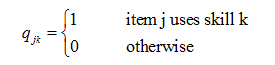
- Κ = the total number of knowledge components in the Q-matrix
Note:
- The Τik parameter estimate (the number of practice opportunities student i has had on the knowledge component k) is constrained to be greater or equal to 0.
- User proficiency parameters (θi) are fit using a Penalized Maximum Likelihood Estimation method (PMLE) to overcome over fitting. User proficiencies are seeded with normal priors and PMLE penalizes the oversized student parameters in the joint estimation of the student and the skill parameters.
The intuition of this model is that the probability of a student getting a step correct is proportional to the amount of required knowledge the student knows, plus the "easiness" of that knowledge component, plus the amount of learning gained for each practice opportunity.
The term "Additive" comes from the fact that a linear combination of knowledge component parameters determines logit(pij) in the equation.
You can view model parameter values and see measures of how well the AFM statistical model fits the data on the Model Values report (a subtab of Learning Curve).
For more information on the AFM algorithm, see the Model Values help page. For assistance interpreting the predicted error rate, you may also contact us.
Student-Step Rollup Example
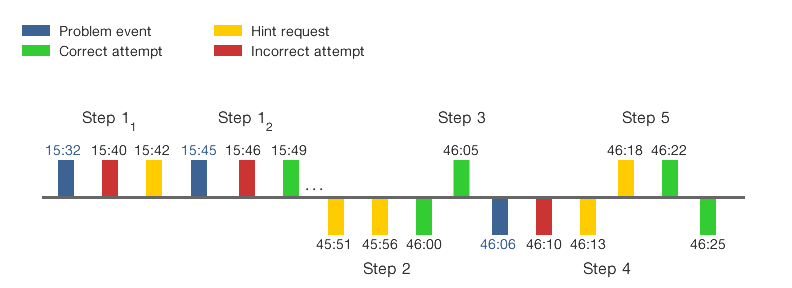
This example demonstrates how DataShop calculates step start time, step end time, step duration, and correct step duration for a student on a series of steps.
To follow the example, refer to the timeline representation of steps and the table of calculated times (both below), and the definitions of student-step rollup fields. Note that steps alternately appear above and below the gray line to improve the readability of the example.
| Step # | Start Time | End Time | Step Duration (sec) | Correct Step Duration (sec) | Notes |
|---|---|---|---|---|---|
| 11 | 15:32 | 15:42 | 10 | null | A problem event precedes the first transaction for the step. DataShop uses the problem event time as the step start time. The step end time is the time of the last attempt on the step. No attempt is correct for this step, so the sum of the durations is the total length of time spent on the step, and there is no Correct Step Duration. |
| 12 | 15:45 | 15:49 | 4 | null | A problem event signifies a new instance of the same problem; it is used as the step start time. The correct attempt is not the first attempt, so again there is no Correct Step Duration. |
| 2 | null | 46:00 | null | null | No problem event precedes the first attempt for the step and the preceding transaction is more than 10 minutes before the first transaction on the step. Given this, DataShop does not calculate a step start time, nor a Step Duration or Correct Step Duration. |
| 3 | 46:00 | 46:05 | 5 | 5 | No problem event precedes the first attempt, but the preceding transaction's time is less than 10 minutes prior so it is used as the step start time. Correct Step Duration and Step Duration are equivalent because the first transaction is a correct attempt. |
| 4 | 46:06 | 46:25 | 4+3+3=10 | null | Step 4 is interrupted by attempts toward Step 5. DataShop excludes time spent toward Step 5 in its calculation of total time spent on Step 4. The step duration is the sum of the durations for transactions at 46:10 (4s), 46:13 (3s), and 46:25 (3s). |
| 5 | 46:13 | 46:22 | 9 | null | No problem event precedes the first attempt, but the preceding transaction's time is less than 10 minutes prior so it is used as the step start time. |